



Slim Sliding Door Smart Lock Waterproof Fingerprint App Control
Hurry up, only 3 items left in stock.
SPECIFICATIONS
Brand Name: ZhdCookey
Certification: CE,FCC,RoHS
Choice: yes
Connectivity: Bluetooth
Doorknob Funcition: Biometric
Fit Door Thickness: 30-110mm
High-concerned chemical: None
Material: Aluminium alloy
Model Number: ZHD-YQ
Origin: Mainland China
Power Supply: DRY BATTERY
Protection Level: IP66
Smart home platform: Other,alexa,Google Assistant
Special Features: Support Gateway
Suitable Door Type: Steel Door,Wooden Door,Glass Door,Stainless Stell Door,Other
Ways To Unlock: App,Bluetooth,Mechanical Keys,CARD,Password,FINGERPRINT
ZHDCOOKEY Model: ZHD-YQ
Slim 2.8CM Waterproof Sliding Door Smart Lock Fingerprint Password IC Card Key Compatibility TTlock App & Alexa Biometric Header
3. Passed waterproof testing, which can be installed outside door with eaves.
4. The lock is aluminum alloy, durable and corrosion resistance;
5. Five kinds unlock ways, fingerprint, password, IC cards, metal keys, Bluetooth App.
6. More mortise for choice, 2885, 3585, 4585, 6085 mortise, please choose the mortise which fit your door.
7. Best choice for slim door, Framed glass door, Aluminum door, KFC door, Broken bridge door, Sliding door.

Patermeters:
Fingerprint Capacity:100 Users
Password Capacity:50 Users
IC Card Capacity:100 Users max
Password length:6-12 numbers
Working Power:4pcs AA batteries(not include)
Power input:DC 4.4V-8V
Low power alarm: 4.8V
Standby current:<45uA
Operation current:<250mA
Working temperature:-20~65℃
Working humidity:15%~95%
Communication:Bluetooth
APP: TTlock
Waterproof: IP65
Emergency Power supply:1xMicro USB port
Suitable door thickness:about 30-110mm


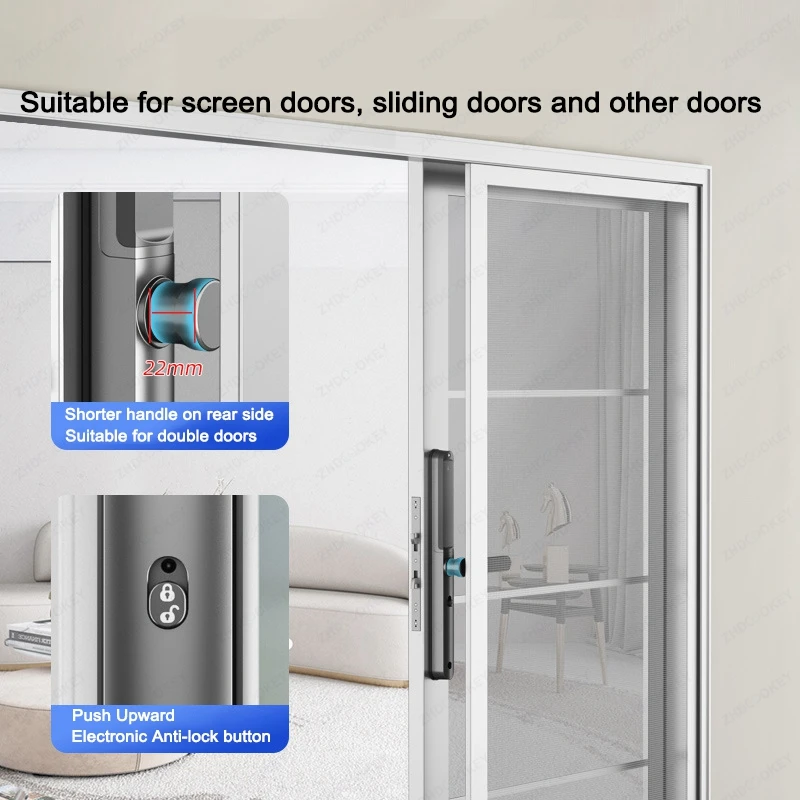
Two Ways of Anti-lock, Double Security
1.Electronic Anti-lock button
2.Up to lift the handle Anti-lock
Note:If the door is locked, Only the administrator can access the door lock,
other users cannot unlock it from outside the door.


Smart Lock Structure:
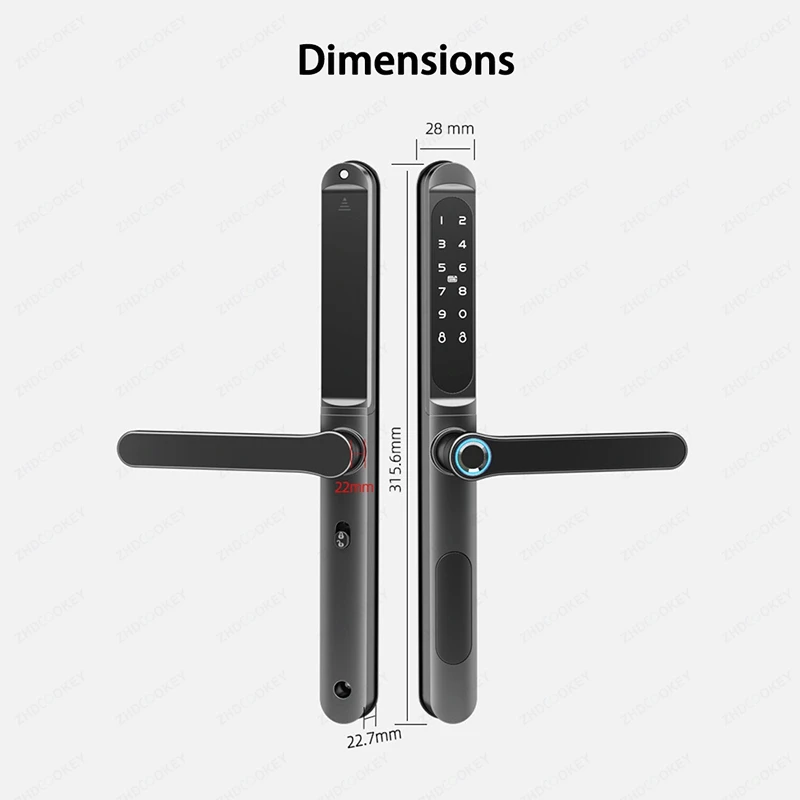
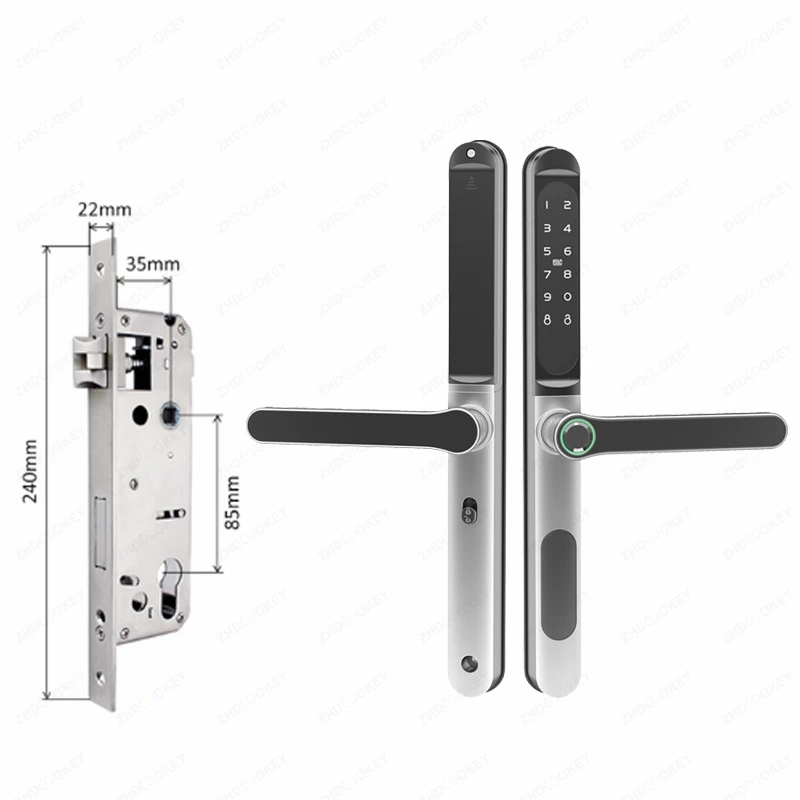
Mortise sizes for choice

TTLock App Functions:
1. Open lock by phone App remotely
2. Add fingerprint, password, IC card, ekey on phone app, no need operate on lock.
3.Send temporary password/ ekey unlock remotely
4. Save the unlock records
5.Connect to the lock by bluetooth


Click below picture to buy ttlock gateway.


Package include:
1x Front lock panel
1x Rear lock panel
2x Waterproof rubbers
1 x Lock mortise
2 x RFID cards
2 x Mechanical keys
1 x User manual
1 x Screws kits
FAQ(Frequently Asked Questions):
Q1,How to add the device to TTLOCK APP?
A:Install the TTlock app on your smartphone, then turn on your phone's Bluetooth and wake up the door lock's screen. Add the device within the TTlock app.
Please refer to the video at the link:https://video.aliexpress-media.com/seller/play/5000430338359.mp4
Q2:Why is my door lock in the normally open mode or the handle won't turn? How do I change the setting?
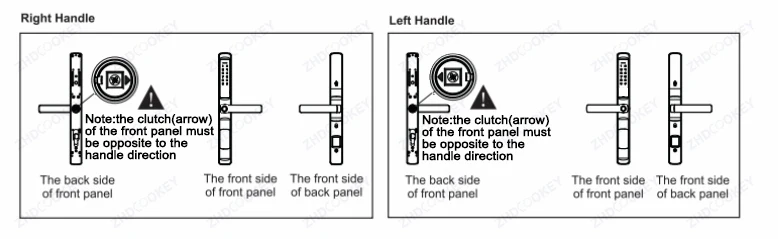
A:Reason:When the arrow direction behind the front panel is in the incorrect position, the door lock is in the normally open mode. When the arrow points upward or downward, the door lock handle cannot be turned.
Correct setup: The arrow direction must be opposite to the handle direction.
When facing the arrow, if your handle opens to the left, the arrow should point toward your left side.
If your handle opens to the right, the arrow should point toward your right side.
Please refer to the video at the link: https://video.aliexpress-media.com/seller/play/5000430338415.mp4
Q3,How to restore factory settings?
A:Longly press the Reset button for 5 seconds on the lock, hear "please enter the initialization password", enter 000#, the lock to restore factory setting, empty all the fingerprint, passwords, cards and administrators records.
Please refer to the video at the link: https://video.aliexpress-media.com/seller/play/5000430342298.mp4
Q4,How to add management fingerprint, IC card and password?
A:Please refer to the instruction manual or the video at the link: https://video.aliexpress-media.com/seller/play/5000430338510.mp4
Q5,How to install the smart lock?
A:Please refer to the manual or the installation video above the product details.
Q6,Why can't the double hook lock body automatically close the lock, but the flat tongue lock body can automatically close the lock tongue?
A:The double-hook lock body is of an anti-prying structure, and the hook can be driven to be withdrawn only by rotating a key or a handle after being popped out, and cannot be pressed back by an impact force; and the flat-tongue lock body is of an inclined plane design, and can be locked by automatically compressing a spring by hitting an inclined plane by a door frame when the door is closed.
Q7,Why doesn't Lock when you directly press the icon Lock key on the keypad? What're the functions of the Lock and Unlock buttons on the keyboard?
A:The Lock key functions as the “*” key and serves two primary purposes: 1) to exit the current menu mode and return to the previous menu; and 2) to delete characters when setting a password in the menu.
The Unlock key functions as the “#” key and is primarily used to confirm selections in the menu settings.
Subscribe and place an order of $75 or more today, and we’ll send you a 10% discount code as a thank-you for your next purchase.
Couldn't load pickup availability
How long will it take to receive my order?
How long will it take to receive my order?
Most U.S. orders are estimated to arrive within 7–12 business days after processing. Orders to other eligible countries are also usually estimated at around 7–12 business days, depending on the product, carrier, and destination. However, delivery is not guaranteed, and some orders may take up to 7–25 business days because of carrier delays, customs, supplier processing, weather, or other shipping conditions.
What if my item arrives damaged, defective, or incorrect?
What if my item arrives damaged, defective, or incorrect?
Contact us within 7 calendar days of delivery. Please include your order number, checkout email, clear photos or video proof, and a short explanation of the issue. If approved, we may provide a replacement, refund, store credit, partial refund, or another suitable resolution.
Where can I find the full policy details?
Where can I find the full policy details?
For complete details about returns, refunds, shipping, delivery, privacy, terms and conditions, legal notices, and customer support, please review our policies under the Legal & Support section in the footer.
These policies explain important information about order processing, delivery timeframes, return eligibility, refund rules, customer responsibilities, and how to contact our support team for help.
Your payment information is processed securely. We do not store credit card details nor have access to your credit card information.

10% OFF NEXT ORDER
Place an order of $75 or more today, and we’ll send you a 10% discount code as a thank-you for your next purchase.


